
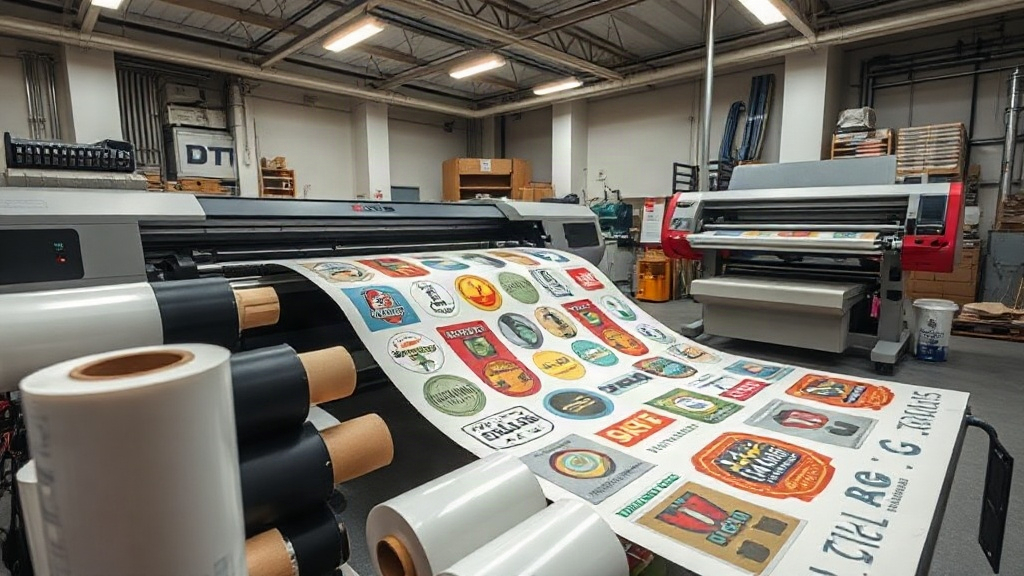
If you run a custom apparel business, you know that efficiency and quality are the keys to staying competitive. DTF printing has emerged as a game-changer, offering vibrant colors and durability on various fabrics. But what if you could take that efficiency a step further? Enter the DTF gangsheet – a method that lets you print multiple designs in one go, saving time and money. In this guide, we'll dive deep into gangsheets, how to create them, and why they might be the missing piece in your production workflow.
What is a DTF Gangsheet?
A DTF gangsheet is a single sheet of transfer film that contains multiple DTF designs arranged together. Instead of printing each design separately, you consolidate them onto one sheet, then transfer them onto garments as needed. Think of it as a digital sticker sheet for your heat press. This approach maximizes the use of your printer's width and minimizes wasted film, resulting in significant cost savings.
Gangsheets are particularly popular among small to medium-sized apparel businesses that need to produce a variety of designs without large minimum order quantities. Whether you're printing t-shirts for a local sports team, a batch of custom tote bags, or promotional hoodies, gangsheets let you handle diverse orders with ease.
Why Use DTF Gangsheets?
The benefits of gangsheets go beyond just saving film. Here are some compelling reasons to incorporate them into your workflow:
- Cost efficiency: By grouping designs, you reduce the amount of transfer film and powder used per design, lowering your material costs.
- Time savings: Printing one sheet with multiple designs takes less time than running each design individually, especially for small orders.
- Consistency: When you print multiple copies of the same design on one sheet, you ensure color and quality consistency across all items.
- Flexibility: Gangsheets allow you to mix different sizes and designs, making it easy to fulfill varied orders quickly.
- Less waste: Optimizing the layout reduces unused film areas, which is both environmentally and economically friendly.
How to Create a DTF Gangsheet
Creating a gangsheet requires some planning and the right tools. Here's a step-by-step guide to help you get started.
1. Choose Your Designs
Select the designs you want to include. They can be different graphics or multiple copies of the same one. Consider the sizes: smaller designs can fill gaps around larger ones. If you're new to DTF printing, start with a few simple designs to practice.
2. Use Design Software
You'll need software that allows you to arrange designs on a canvas that matches your film size. Popular options include Photoshop, Illustrator, or dedicated RIP software like Cadlink or AcroRIP. Set your document to the exact dimensions of your film (e.g., 13" x 19" or 22" x 24"). Import your designs and arrange them with adequate spacing (usually 0.2-0.5 inches) to prevent overlapping during cutting.
3. Optimize the Layout
Arrange your designs to maximize the use of space. Rotate designs if needed, and nest smaller items into empty areas. Keep in mind that you'll need to cut around each design after printing, so leave enough room for trimming. If you're printing on rolls, you can create longer gangsheets, but ensure your printer supports continuous printing.
4. Print and Cure
Print your gangsheet using your DTF printer. Ensure you use quality DTF film and powder. After printing, apply hot melt adhesive powder evenly, shake off excess, and cure the sheet in an oven or with a heat press according to your powder's specifications. Proper curing is crucial for wash durability.
5. Cut and Store
Once cured, cut out each design. You can use scissors or a cutting machine for precision. Store the transfers in a cool, dry place away from direct sunlight. They can last for months if stored properly.
Tips for Efficient Gangsheet Printing
To get the most out of your gangsheets, consider these practical tips:
- Plan ahead: Group designs by order or customer to streamline production.
- Test your printer: Run a small test gangsheet to check color accuracy and alignment before large batches.
- Keep a library: Save your gangsheet layouts for repeat orders to save time.
- Mind the gaps: Leave enough space between designs for easy cutting and to avoid powder contamination.
- Use quality supplies: Cheaper film or powder can lead to poor transfer quality and wasted effort.
Common Mistakes to Avoid
Even experienced printers can slip up. Watch out for these pitfalls:
- Overcrowding: Placing designs too close can cause cutting errors and powder overlap.
- Inconsistent curing: Under-cured transfers crack; over-cured ones may not peel correctly. Follow your powder's guidelines.
- Ignoring film orientation: DTF film has a printable side; printing on the wrong side ruins the sheet.
- Not accounting for shrinkage: Some fabrics shrink after pressing, so pre-shrink if necessary.
Frequently Asked Questions
What is the difference between DTF and DTG printing?
DTF (Direct to Film) involves printing onto a film, then transferring to the garment with heat. DTG (Direct to Garment) prints directly onto the fabric. DTF works on more fabric types, including polyester and blends, while DTG is mainly for cotton. DTF also allows for gangsheets, which DTG does not.
Can I use a DTF gangsheet on dark garments?
Yes, DTF printing uses a white ink layer, so it works on both light and dark fabrics. The white base ensures colors pop on dark backgrounds.
How long do DTF transfers last?
When properly applied and cared for, DTF transfers can last 50+ washes. Wash garments inside out in cold water and avoid harsh detergents to extend life.
Do I need a special printer for gangsheets?
Any DTF printer can print gangsheets; you just need to arrange designs to fit your film size. No special equipment is required.
Can I create a gangsheet with different designs for different customers?
Absolutely. Gangsheets are ideal for mixing designs. Just ensure each design is clearly separated for easy cutting and identification.
Conclusion
DTF gangsheets offer a practical solution for custom apparel businesses looking to boost efficiency and reduce costs. By mastering the art of gangsheet creation, you can take on more orders without sacrificing quality. Remember to plan your layouts, use quality supplies, and follow best practices for curing and storage. With these tips, you'll be well on your way to streamlined production and satisfied customers.